
To use the charge level allocation function, navigate to any cost & usage table that contains the charge you wish to allocate. Such as Navigating > Telecom Expense > Bill Analysis and Selecting an invoice with applicable charges:


On the cost & usage tab, Click on Edit cost centre allocation button next to the charge you want to split and allocate to different cost centres:

In the popup modal, you can select which cost centres you want to split the charge (there is no limit to how many cost centres the charge can be split across):

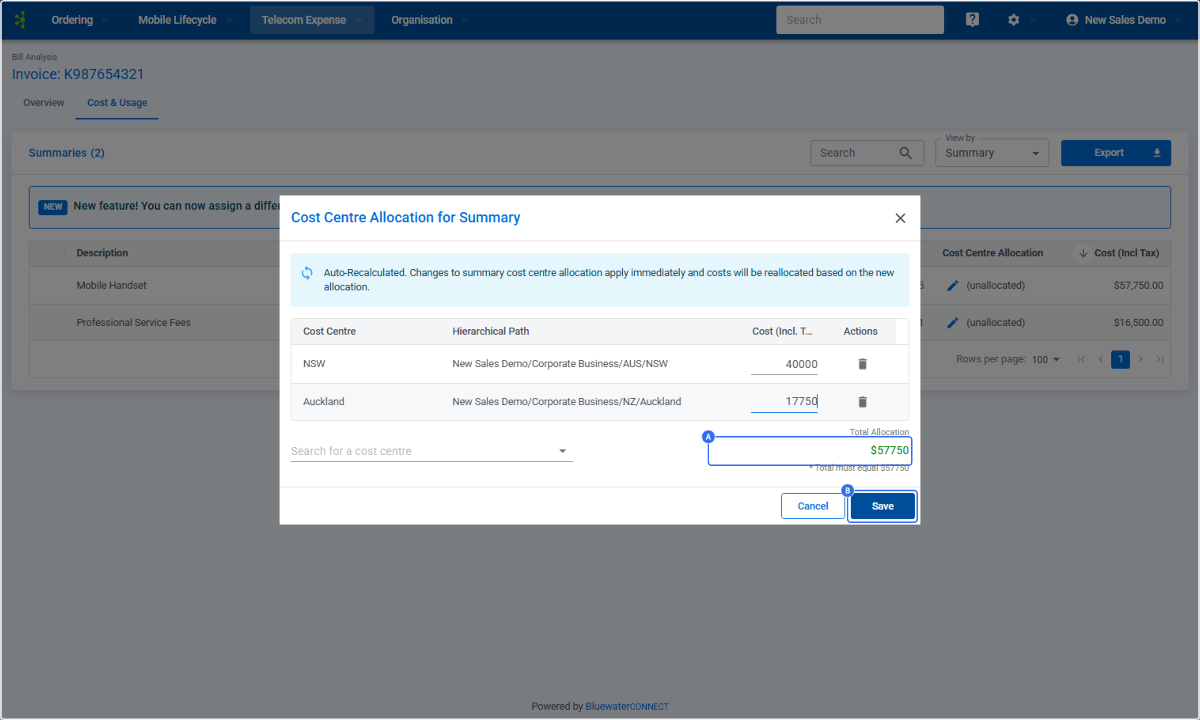
Once you have added all the cost centres the charges are to be split across, you can enter the $ amount for each cost centre allocation:


Once all allocations have been made, verify that the amount allocated matches the total Allocation amount. Then click "Save" to apply your allocations
Following saving, the new split of the charges made will apply to all cost allocation based reports in your current report month and will display in the portal as such:

Additional Details
-
Any allocations made will only apply to the current charge and will not continue into the next month for any charge types. New allocations will need to be made to the same charges in the following month if required.
-
No summary charge allocations can be made against historical charges/bills.