
Ordering / Assist Enhancements
-
Order 'Watcher' Notifications (new order requests only, service/device requests coming soon)
-
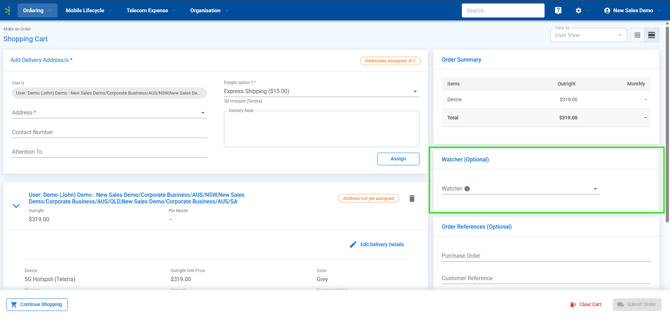
- Users can now add "Watchers" to orders. Added watchers will receive the same email notifications and status updates as the original submitter, you can add a watcher while you place the order on the "Order Summary" page as shown in the screen below:
- Bulk Completion of Assist Requests
-
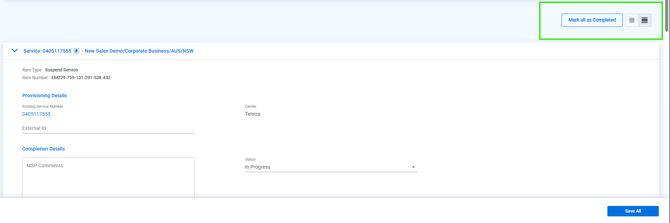
- MSP Portal Users can now bulk-complete all "In Progress" items within specific assist requests (e.g. cancellations, reconnections) with a single click, the option to perform this will be visible on all applicable orders in the top right of the order view page, as show below:
Reports & Listing Enhancements
- Access both Standard and Customised GL
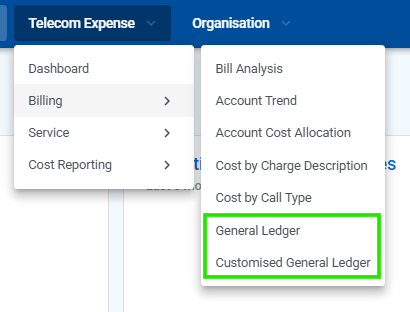
- Enables finance teams to toggle between consistent standard reporting and tailored accounting formats within the customer portal. Both options (if enabled) are located under the Telecom Expense > Billing tab in the menu:
Misc. UX Improvements
- Mange Columns and Filters Quick Access buttons
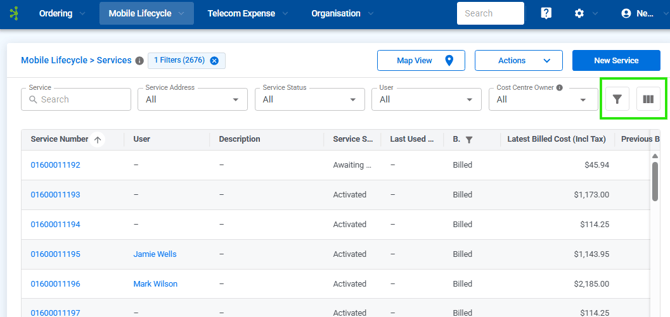
- In tables with quick filter, the "Manage Columns" and "Filters" options have been moved to a more prominent location.
They are now available as standalone buttons at the top-right of the table for quicker access:
- In tables with quick filter, the "Manage Columns" and "Filters" options have been moved to a more prominent location.
- Dynamic Unified Search Bar
-
- Improved the search experience by allowing the search bar to expand rightwards when active, maximizing space for results and long tenant names:
