
-
Configurable Standard GL
The Standard GL was a rigid export customers reformatted by hand each month. On-screen review, configurable columns, headers and clearing line landed over the last two releases. This release lifts the cost centre hierarchy limit.
Full GL video guides here
-
Service listing: Service Address Filter in Service Listing
The service address filter becomes a dropdown that filters both the table and the map, with the full address shown on hover. - Billing accounts: Multiple Billing Accounts in Reports
The Billing Account filter now accepts several accounts at once, so a report can be run across them without repeating it per account.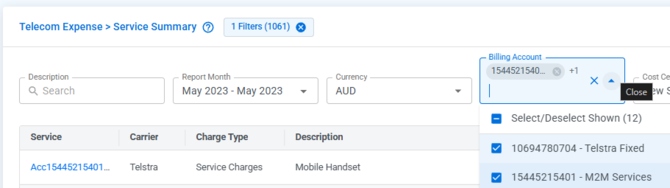
-
Users and devices: Filter and Manage Columns on Users and Devices
Both listings now show the search bar in the quick filter bar alongside the Filter and Manage Columns icons.
- Cost and usage: Service Charge Costs Links to Cost & Usage
The latest report month cost is now a link through to Cost & Usage on the Service Profile, carrying the filters across.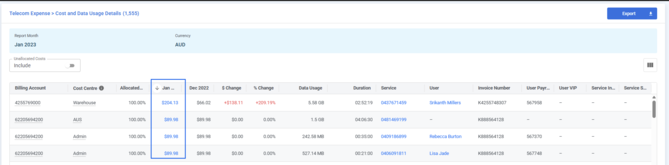
-
Report navigation: View Report Button Honours Your Home Page
The View Report button in the Cost Centre Report email now lands on the user's configured home page rather than the dashboard.
-
Profiles: Service, Device and User Profiles
The Service, Device and User profiles are hard to scan, with excess white space and fields that carry nothing for the record. All three were regrouped into cards last release; the CDR fields arrive now.
-
Carrier details: Carrier Plan and Features on the Service Profile
A read-only Carrier Plan & Features card shows plan, carrier status and barring details from the CDR file, with the date last reported.
-
Empty states: Empty States for Unconfigured Dropdown fields
Dropdown fields such as Type and Sub-Status with no options configured now explain why and point to Portal Settings across the three profiles.
-
Dropdowns: Clearer Dropdown Options
Dropdown options now align with the filter width, cap at a maximum width and show the full text when an option is too long.
-
Search: Consistent Search Quick Filter Across Reports
The search quick filter now follows the Service Listing layout on every report, with the searched column named and the icon on the left.
-
Cost centre allocation: Clearer Messages and Copy Flow for Cost Centre Allocation
Assigning a service with a partly allocated cost centre now explains what to fix, rather than leaving the service in a broken state. Unticking Copy before saving now clears the copied allocation rather than applying it anyway.
-
Activity logs: Source Record in Activity Logs
Activity log entries now name their source record, a bill number for billing data and the CDR file name for pre-bill data usage.
-
Portal settings: Portal Settings as a Side Menu
The tabs across the top of Portal Settings become a fixed side menu, so the full list of settings is visible at once.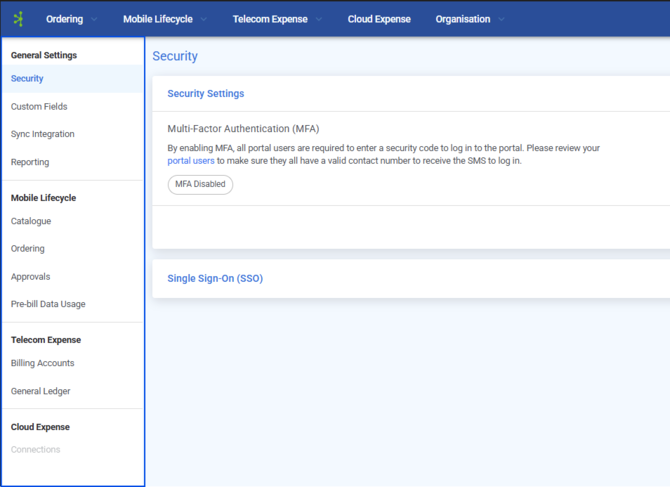
-
UEM sync: Exclude Personal Devices from UEM Sync
A new Sync Personal Devices toggle keeps personal devices out of the inventory. It defaults to on and leaves already synced devices untouched.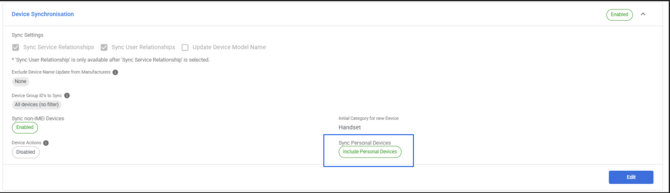
-
Email recipients: Cost Centre Managers as Workflow Email Recipients
The workflow email action can now send to the Cost Centre Manager with backup addresses. The portal user opt-out becomes Email Opt-outs for Enterprise customers.
-
Email opt-outs: Clearer Workflow Email Opt-Out Label
The portal user opt-out is now labelled Workflow Email (Cost Centre Manager), so admins can see which recipients it covers.
-
Data usage: Data Usage in Dynamic Units in Workflow Emails
Data usage in workflow emails now displays in MB, GB or TB according to size, instead of always MB.
-
Email consolidation: Consolidate Similar Workflow Emails
A checkbox on the Send an Email action holds similar emails for a quiet period, then sends them as one combined message.
-
Approvals: Approval Status on Order Details
Where a cart has been through approval, the Order Details page now shows the same View Approval Status pop-up and history as the cart.
-
Provisioning accounts: Provisioning Account Dropdown Layout
Across ordering, the dropdown now shows the account number on the top row and the account name below it.
-
Device procurement: Purchase Option on Devices
Devices now carry a Purchase Option such as Outright, ARO or Lease, editable on the profile and available on the listing and CSV import.
-
Purchase price: Correct Purchase Price on Order Completion
On order completion, Purchase Price follows the purchase option: monthly cost by term for MRO and ARO, empty for Lease, outright price for Outright.
-
Cloud dashboard: Cloud Spend Widget
Total cloud spend for the selected report month, with the movement against the prior month in dollars and percentage, drilling through to Monthly Cloud Cost.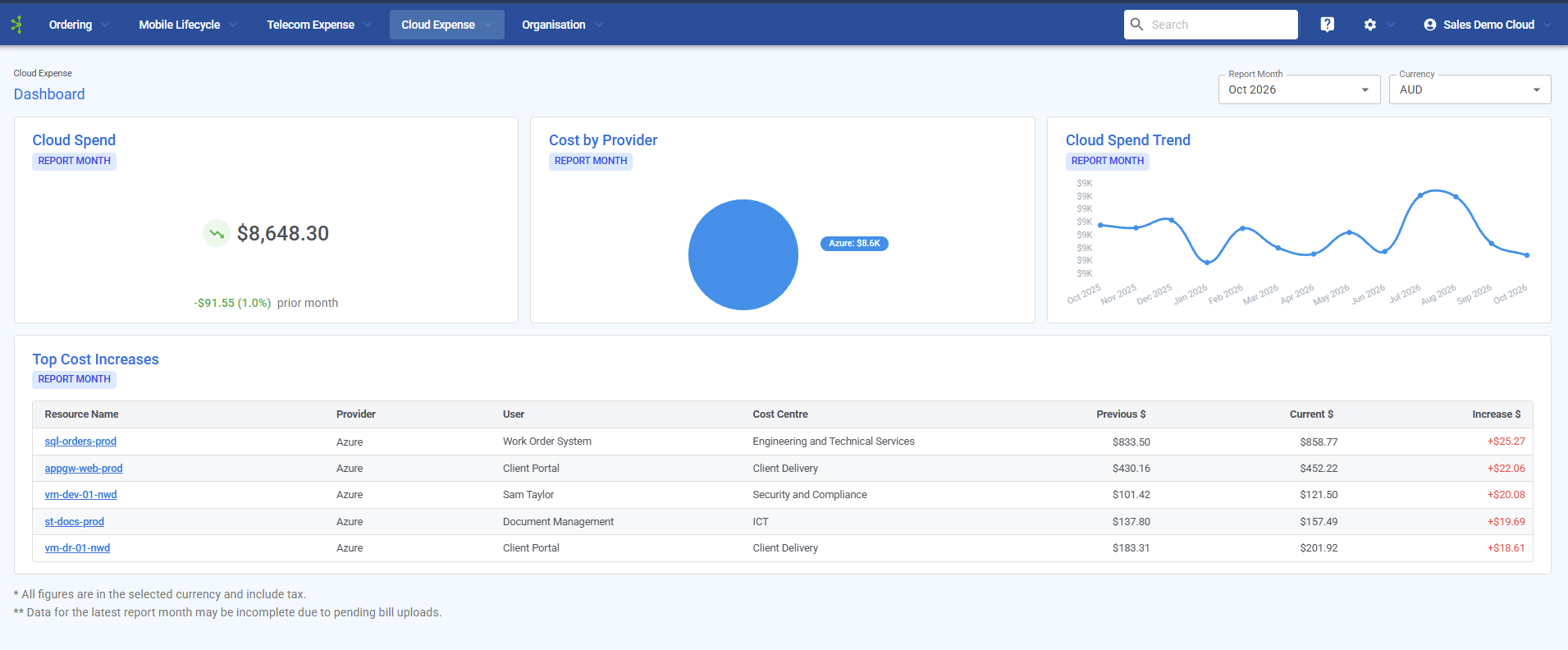
-
Spend trends: Cloud Spend Trend Widget
A line graph of total monthly cloud spend across the trailing 12 months ending at the selected report month.
-
Cost increases: Top Cost Increases Table Widget
The five resources with the largest month on month increase, with provider, user and cost centre, each linking to Resource Cost & Usage.
-
Beta access: Beta Landing Page for Customers Without Cloud Expense
The Cloud Expense menu item is now visible to everyone, and users without access land on a beta page where they can register interest.
-
AWS integration: Read-only AWS Connection
The AWS setup wizard now offers a Data access step, so customers can keep their own S3 export and give Connect read-only access, with CloudFormation templates provided.
-
Landing page: Cloud Dashboard as the Default Landing Page
Tenants with Cloud Expense but no Mobile Lifecycle or Telecom Expense now land on the Cloud Expense Dashboard at sign in.
-
Cloud reporting: Cloud Spend Trend Report
A new report under Cloud Expense charts monthly cloud spend across a month range, with the columns, filters and export of Monthly Cloud Cost.
-
Resource ownership: User and Cost Centre on Resource Cost & Usage
The Resource Cost & Usage report now shows User and Cost Centre, keeping ownership context when drilling in from Top Cost Increases.